The
AI
does
the
work.
You
govern
it.
Every tax platform shipped AI this year. Every one of them bolted it onto the same screens you've been clicking through for a decade. We asked the only question that matters: when AI does the work, what does the professional's day actually become? The answer is four verbs, verified reasoning, and a morning that's done by 9:15.
The Four Verbs
This is what your morning looks like.
You open TaxAssistIQ. It's 8:47 AM.
items processed
overnight
resolved
automatically
need
you
That's your morning. Compare it to yesterday's.
One of those three items:
The system found:
W-2 says "Smith and Associates LLC"
IRS records show "Smith & Assoc LLC"
EIN matches. Address matches. Compensation matches.
72% confidence: likely the same entity, cosmetic difference.
Four choices. Every time. For everything.
Confirm
"Same entity. Proceed."
Item resolves. Disappears. Eight seconds.
Inquire
"Show me the W-2 and IRS transcript side by side."
Evidence appears inline. No new window.
Adjust
"The LLC restructured in October. Use the new name."
System learns. Recalculates downstream.
Delegate
"Flag this for Sarah. She handles Smith entities."
Full context transfers. Nothing lost.
No menus. No tabs. No workflows to learn.
The system presents its work. You decide. Four verbs. Morning's done.
Every position is source-cited. Every step links to the IRC section, the transcript line, the client document. Tap any claim and verify it yourself.
Every tool you use was built for you to operate.
That model is ending.
Your software was designed for a world where humans do the work and tools assist. AI changed that equation overnight — but your vendors didn't change the interface. They stapled intelligence onto screens built for manual operation and called it innovation. These aren't technology problems. They're symptoms of a paradigm that no longer fits.
Your system can't act, so your team chases
69% of firms report significant delays in document collection. Not because clients are lazy — because the software can't do anything about it. It sits there. Your staff sends the fourth reminder. A system built for delegation handles the back-and-forth directly. Your team gets organized, verified data — not another follow-up thread.
They built AI first. Privacy was an afterthought.
Every AI tax product asks you to upload client data to their cloud. Their security. Their retention policy. Their compliance posture. They added intelligence first and figured out data sovereignty later — if at all. You advise clients on data protection, then hand their SSNs to a vendor you can't audit.
The software speaks tax. Your clients don't.
They don't know tax forms by number. They don't know what's missing or why it matters. So they delay — and 64% of firms absorb the scope creep that follows. The problem isn't your clients. It's software that was never designed to meet people where they are.
Eight tools because none of them do enough
The average firm runs eight disconnected applications. Your staff loses four hours per week switching between them. Why eight? Because each one was built to be operated by a human for one task. Stack enough single-purpose software together and you get a Frankenstein practice.
AI everywhere. Review nowhere.
Every platform shipped AI that drafts returns. Not one redesigned what it means to check that work. You're clicking through the same screens, the same tabs, the same workflows — now with an AI copilot bolted onto the side, explaining what it did in a chat window. The AI got smarter. The experience stayed in 2015.
They renovated. We replaced.
They took interfaces designed in the 1990s, added copilot sidebars, and called it transformation. The architecture underneath hasn't changed. The interaction model hasn't changed. You still navigate to find work. You still operate the software. The only thing that changed is now there's a chatbot asking if you need help. You don't need help operating software. You need to stop operating software entirely.
They added AI to software.
We built something else entirely.
In , every major tax platform shipped AI features — copilot sidebars, chatbots, autocomplete. Each one stapled intelligence onto an interface designed for a completely different era.
We didn't start with their interface. We started with a question: when AI does the work, what does the professional actually need?
The answer was four verbs and verified reasoning. Nobody else built it — because building it meant throwing out everything they already had.
What they shipped
A chatbot bolted onto the same forms. A copilot sidebar explaining what the software did. You still navigate. You still operate. The AI assists. You do the work.
What we built
The AI does the work. Presents it with verified reasoning — source-cited, confidence-scored, auditable in seconds. You govern with four verbs. The system operates. You decide.
The difference
Their interface has AI inside it. Our AI has an interface inside it. One adds intelligence to software you operate. The other eliminates the need to operate software at all. That's not an upgrade. That's a replacement.
How It Learns
Think of it like a new hire.
It earns responsibility over time.
You wouldn't hand a new associate unsupervised access on day one. Neither would we. The system starts by showing you everything. As you confirm its work, it learns your standards. You decide when and where to give it latitude — and you can take it back at any time.
Week One
See everything
You Confirm everything. Every position, every data point, every confidence score comes to you. Nothing is auto-approved. The system learns your judgment with every decision you make.
Month Two
Set your thresholds
Items you consistently Confirm get auto-resolved. Your morning gets shorter. You set the rules — by return type, by confidence level, by dollar amount. Your thresholds, not the system's.
Tax Season
Focus on what matters
Two items need you. The rest is handled. Four verbs, ten minutes, twice the clients. Your stream shows only genuine exceptions — the complex returns, the edge cases, the judgment calls only you can make.
The system never promotes its own authority. It never moves from "review" to "auto-approve" on its own. You set every threshold. You control every boundary. And you can dial it back to full review at any time.
For CPAs
This is what your practice looks like now.
In the software you use today, you navigate to screens and tell the system what to do. You spend your day operating. In delegative computing, that's inverted: the system does the work, presents it with verified reasoning, and you govern the outcome. You open your stream. It shows you what needs you — and only what needs you. Routine work is already handled. Exceptions float to the top. The stream gets quieter as the system earns trust. Your day shifts from operation to judgment.
Every position is source-cited. Every step is verifiable. Tap any claim and see the IRC section, the transcript line, the client document — right there, inline. No new window. No separate screen. No guessing what the AI did.
When you Adjust, the system learns. When you Delegate, the next person sees everything you saw. When you Confirm, the item compresses and vanishes. Made a mistake? Undo within 15 seconds — no consequences, no awkward corrections.
Filing deadlines track themselves — smart defaults for individuals and entities, urgency sorting so April 15 and March 15 returns surface when they matter. Client questions get drafted responses you can send with one tap, edit, or replace. The system does the legwork. You make the call.
The screen gets emptier over time. That's the product working.
Your data is yours. Always. If you ever decide TaxAssistIQ isn't right for your firm, we hand everything back — client records, return history, documents, work product — in open formats you can take anywhere. No exit fees. No retention calls. No hostage negotiations. We stand on the quality of what we build, not on trapping you in it.
Export formats: MeF XML, branded PDFs, structured JSON, original documents, FDX 6.0 JSON.
Good morning, Jane.
Paul at Higgins & Campbell has your return underway. 3 documents received, 2 more would help.
We received your W-2 from Acme Corp.
Wages: $87,400 · Federal withheld: $12,180
Did you make any contributions to a retirement account in 2025?
Status
Your return is in review
Paul will reach out if anything needs your attention.
For Your Clients
Their experience should feel like working with an intelligent partner.
Not a portal to figure out. Not a form to fill. Your client receives an invitation with your firm's name on it, sees their name on the welcome screen, and is inside a secure space in under 60 seconds. Then the system takes over — acknowledging every document, showing what was extracted, asking smart questions when something's missing, and keeping them informed as their return progresses. No chasing. No confused calls. The same delegative experience you have, built for people who don't speak tax.
They're recognized before they register
The first screen shows your firm's logo and their name — because you already told the system who they are. They feel known before they type a single character. Email and password. That's it. Inside in under 60 seconds.
Every document acknowledged instantly
Upload a W-2 and the system immediately confirms: "We received your W-2 from Acme Corp — $87,400 in wages, $12,180 withheld." Your client sees exactly what was extracted. No silence. No wondering if it went through.
The system asks the smart questions
When the system spots a gap — missing cost basis, no retirement contribution data, rental income without expenses — it asks the client directly, in plain language, with multiple-choice options. Your staff doesn't send the fourth reminder. The system handles it.
Questions answered before they reach you
When your client asks "What's the status of my return?", the system answers instantly from real data. For harder questions — "Can I deduct my home office?" — the system drafts a response using your client's actual numbers, and you confirm it with one tap. Complex questions that need your judgment route to you with full context. Your clients feel heard. Your time stays protected.
46% of firms have no formal onboarding process. For many of your clients, this will be the first time their CPA's technology made them feel taken care of — not processed.
Security
Every other AI tax product asks you to trust their cloud. We made that question irrelevant.
We didn't build a better security policy. We built an architecture where client PII never reaches the AI in the first place. TaxAssistIQ runs on your infrastructure — a dedicated server, not a shared cloud. A privacy pipeline strips all personally identifiable information before any data leaves your environment. The AI gets the tax problem. It never gets the person.
Your Infrastructure
Documents are ingested, OCR'd, classified, and encrypted on your infrastructure. PII never leaves your environment unredacted. Not our servers. Yours.
PII Stripped Before AI Sees It
Before any data reaches the AI, a privacy pipeline strips all personally identifiable information — names, SSNs, addresses, account numbers. The AI reasons on clean, structured data. It never knows who your clients are.
AES-256 Encryption at Rest
Every document is encrypted before storage. The vault is yours. No shared infrastructure, no multi-tenant databases, no co-mingled data.
Not Locked to One AI Vendor
TaxAssistIQ works with multiple AI providers — Claude, GPT, Gemini, or local models on your own hardware. If one raises prices or changes terms, you switch. Zero lock-in.
Your Data, No Strings
If you ever leave, you leave with everything — client records, return history, documents, work product — in open formats. No exit fees. No retention calls. We earn your business every day, not by holding your data hostage.
Single-Tenant Architecture
Your instance is yours alone. Not a row in someone else's database — a dedicated server with its own database, its own encryption vault, its own processing pipeline. No data co-mingling. Ever.
Three-Layer Privacy Architecture
taxassistiq.com
Marketing, firm routing, license management. Contains zero client tax data.
Your infrastructure
Full stack runs locally. Ingestion, OCR, encryption, database, professional interface, client experience. Everything stays here.
Model-agnostic
Claude, GPT, Gemini, or local. Receives only PII-stripped, structured data — never names, SSNs, or addresses. Returns tax reasoning and confidence scores.
What the AI actually sees
Client uploads
W-2 PDF
Local OCR +
classification
PII detected
+ stripped
type: W-2
wages: $87,400
fed_withheld: $12,180
filing_status: MFJ
name: [REDACTED]
ssn: [REDACTED]
Structured extract
sent to AI
Tax reasoning
returned
The AI gets the tax problem. It never gets the person.
Learn
See the vision. Understand the architecture.
Watch the overview, or step through the actual product — the confidence-scored stream, the ⌘K intent surface, and a verified reasoning path.
The AI does the work. You govern it.
A concise overview of TaxAssistIQ — from the pain of modern tax practice to a fundamentally different relationship with your work.
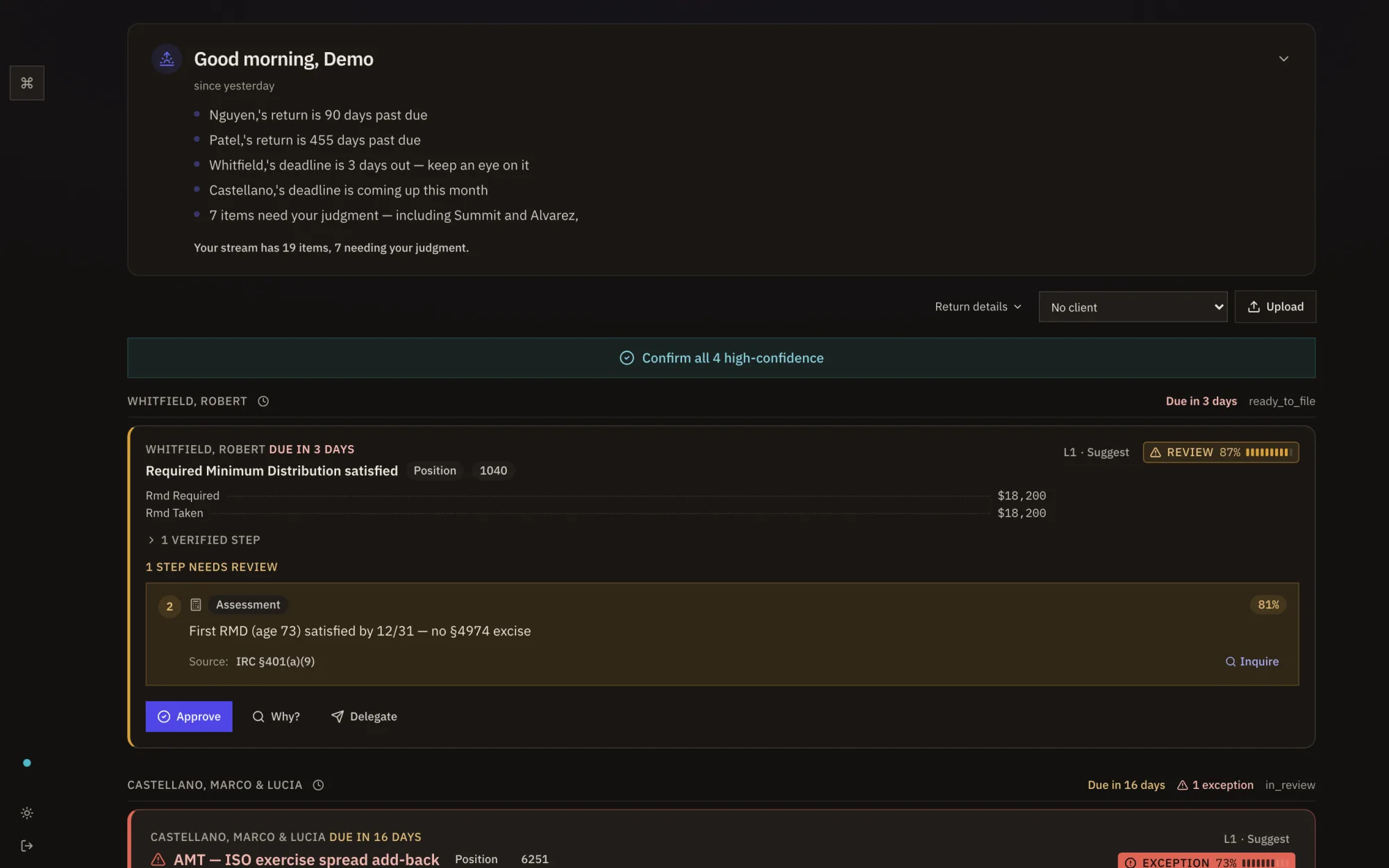
Inside the product
The confidence-scored resolution stream — routine work resolved, exceptions surfaced, every position source-cited. Real screens, not mockups.
The Shift
This isn't a software decision. It's a practice decision.
AI adoption in accounting went from 9% to 41% in a single year. 93% of firms increased their technology spend. Only 27% believe it's aligned with their goals. Every vendor is shipping AI features. Not one of them is changing the fundamental relationship between the professional and the software.
That change is coming whether they build it or not. The only question is whether you're ahead of it or adapting to it.
AI adoption in accounting, one year
of firms increased tech spend
say their stack aligns with goals
Early Access
The firms that move first set the standard.
TaxAssistIQ is in early production with select firms. Four verbs. Verified reasoning. Your infrastructure. Your AI model. Your rules. If you've been waiting for someone to build the system that AI-powered tax practice actually requires — we did.
No commitment. No demo deck. A real conversation about whether your firm is ready for what's next.
Frequently Asked Questions
What CPAs ask before they commit
What is TaxAssistIQ?
TaxAssistIQ is the first system built entirely for governing AI work in tax practice. AI agents prepare returns, research every position, and present their work with verified reasoning paths you can trace to the source in seconds. You interact through four verbs: Confirm the work, Inquire when you need more, Adjust what needs changing, or Delegate to your team. The system delivers resolutions — organized, confidence-scored, source-cited. You don't operate it. It operates for you. Built in , it runs on your dedicated infrastructure, works with your choice of AI model, and earns autonomy through a trust ratchet you control entirely.
Where does my clients' data go?
All client data, documents, and financial records stay on your firm's dedicated infrastructure. TaxAssistIQ's AI reasoning layer receives only anonymized, PII-stripped structured data — never names, SSNs, or addresses. You control the servers, the encryption, and the retention policies.
How does TaxAssistIQ differ from other AI tax software?
Every other AI tax tool in – added intelligence to an existing interface — copilot sidebars, chatbots, auto-fill suggestions bolted onto the same screens you've been clicking through for a decade. TaxAssistIQ was built from scratch around a different question: when AI does the work, what does the professional actually need? The answer is four verbs and verified reasoning. Their interface has AI inside it. Our AI has an interface inside it. That's not an upgrade — it's a replacement. Plus four structural differences no other platform combines: data sovereignty, model independence, trust ratchet, and verified reasoning paths.
What AI models does TaxAssistIQ support?
TaxAssistIQ is model-independent. It supports frontier AI models including Claude (Anthropic), GPT (OpenAI), and Gemini (Google), as well as local models via Ollama for fully air-gapped deployments. Your firm chooses which models to use based on your security and performance requirements.
What happens to my data if I leave?
You take it with you. All of it. Client records, return history, documents, work product — exported in open formats: MeF XML for e-filing, branded PDFs, structured JSON, original uploaded documents, and FDX 6.0 JSON for financial data exchange. No exit fees, no retention calls, no waiting period. We built TaxAssistIQ to earn your business every day, not to hold your data hostage. Best of luck wherever you go — we mean that.
What are the four interaction verbs?
Confirm: accept the system's work and move on — the item resolves and disappears. Inquire: dig deeper into any step — view the source, request more information, or flag what you need before deciding. Adjust: correct a specific step — the system records your change, recalculates downstream, and learns from your judgment. Delegate: route the item to another person on your team with full context preserved. These four verbs handle every interaction. No menus, no tabs, no workflows to learn.
What does "verified reasoning" mean?
Every tax position TaxAssistIQ produces comes with a verified reasoning path — a structured chain of steps where each step cites a specific source: an IRC section, a revenue ruling, an IRS publication, or a line from the client's own documents. You can tap any step to see the source material inline. This is an auditable chain you can verify in seconds, not a summary or a black-box answer.
What is delegative computing?
Delegative computing is the third paradigm of how people interact with technology. The first was batch processing — submit a job, wait for results. The second was direct manipulation — the era of dashboards, menus, and forms that most software still uses. The third is delegative: you set intent, an intelligent system executes across tools, and you govern exceptions. TaxAssistIQ is built entirely for this third paradigm. Instead of navigating software to find work, the system presents its work to you — organized, confidence-scored, source-cited — and you direct it with four verbs: Confirm, Inquire, Adjust, Delegate.